Article · Comparison
CLAUDE.md vs AGENTS.md: one instruction file or two, and what changes at team scale
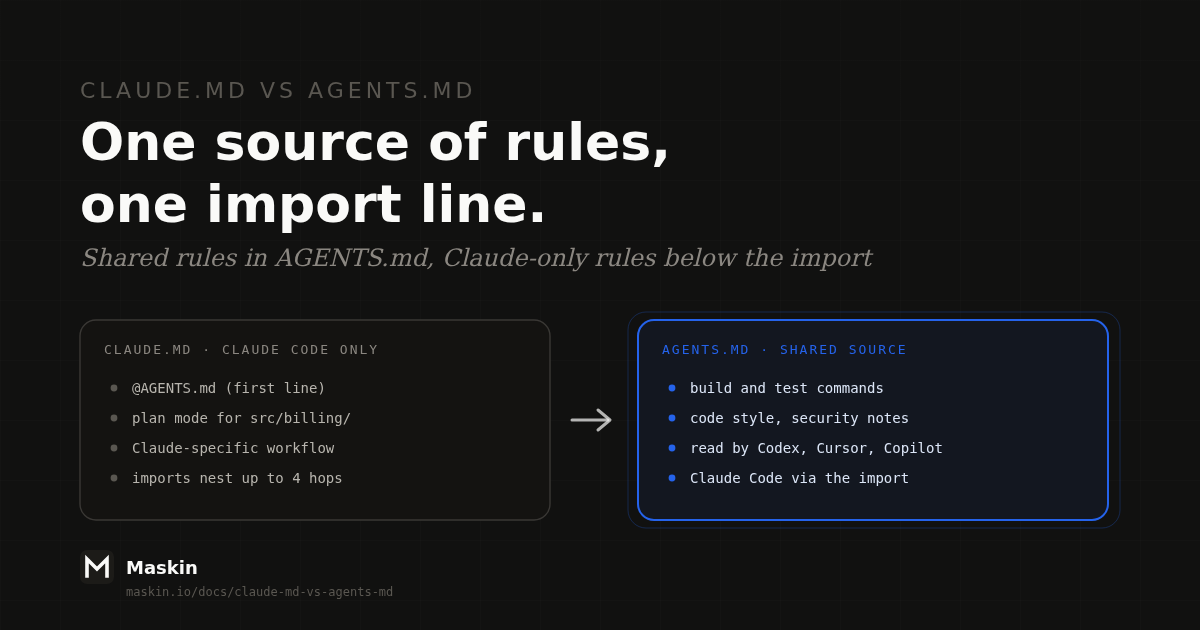
Keep your shared rules in one AGENTS.md. Codex, Cursor and GitHub Copilot read it, and Claude Code reads it when the repo has no CLAUDE.md. If you need Claude-only rules, add a CLAUDE.md whose first line is @AGENTS.md. Once a CLAUDE.md exists, Claude Code reads AGENTS.md only through that import, unless you change a setting.
Tool behavior below was checked against each vendor’s own documentation on 8 October 2026. This area changes fast, so re-check the table before you rely on it.
- One source of rules, two filenames.
AGENTS.mdis the open format, stewarded by the Agentic AI Foundation under the Linux Foundation.CLAUDE.mdis Claude Code’s own file. Keep the rules in the first and let the second import it. - Claude Code prefers
CLAUDE.md. It readsAGENTS.mdby default only when noCLAUDE.mdorCLAUDE.local.mdexists in the working directory or above it. A strayCLAUDE.local.mdturns yourAGENTS.mdoff. - Nesting does not behave the same everywhere. Claude Code concatenates every file it finds. Codex adds one file per directory and stops at a size cap. The
AGENTS.mdspec says the closest file wins. - Files are per repo and per tool. The moment a team has several repos and several agents, the same rule gets copied, and the copies drift.
- An instruction file is a request, not a lock. Anthropic’s docs say Claude treats these files as context, not enforced configuration. Use a hook to block an action.
Which tools read which file?
The table shows what each tool reads from a repository, taken from each vendor’s docs:
| Tool | Reads AGENTS.md | Reads CLAUDE.md | Catch |
|---|---|---|---|
| Claude Code | Yes, if the repo has no CLAUDE.md or CLAUDE.local.md (v2.1.277 or later) | Yes, first choice | A CLAUDE.md that imports @AGENTS.md pulls it in explicitly |
| Codex | Yes, after checking AGENTS.override.md in each directory | Only if you list it in project_doc_fallback_filenames | Combined instructions are capped at 32 KiB by default |
| Cursor | Yes, including nested files in subdirectories | Cursor’s rules docs do not mention it | Do not assume it |
| GitHub Copilot | Yes, nearest file wins | Yes, one file at the repo root | Also reads .github/copilot-instructions.md |
| Gemini CLI | Only if you add it to context.fileName | Only if you add it to context.fileName | Default file is GEMINI.md |
Sources: Claude Code memory docs, Codex AGENTS.md guide, Cursor rules docs, GitHub Copilot repository instructions, Gemini CLI context files and agents.md.
The agents.md site lists more than twenty supporting tools, including Codex, Cursor, Gemini CLI, GitHub Copilot, Aider, Zed, Windsurf, Warp and VS Code. Claude Code now reads AGENTS.md itself, which makes the old advice to symlink one file to the other unnecessary in most setups. For the two agents compared head to head, see Claude Code vs Codex.
Which setup should you pick?
Pick by how many different agents touch the repo:
- Only Claude Code: keep
CLAUDE.md. Nothing else is needed. - No Claude Code: keep
AGENTS.md. Nothing else is needed. - Claude Code plus any other agent: put the shared rules in
AGENTS.md. Add aCLAUDE.mdthat imports it and holds only what is Claude-specific. - Both files already exist and disagree: merge them into
AGENTS.mdfirst, then add the import. Do not start by symlinking, because the symlink hides which copy was right.
Case 3 is the one most teams are in. Anthropic’s own example looks like this:
@AGENTS.md

## Claude Code

Use plan mode for changes under src/billing/.
Claude reads the imported file first, then the Claude-specific section. Imports expand at launch and can nest up to four hops deep.
Import, symlink, or let the fallback work?
There are four ways to get AGENTS.md in front of Claude Code, and each has a failure mode:
- Do nothing. Works only while the repo has no
CLAUDE.md, noCLAUDE.local.md, and your Claude Code is v2.1.277 or later. Anthropic notes that before v2.1.281, some sessions (Amazon Bedrock, or telemetry disabled) readCLAUDE.mdfiles only. - Import with
@AGENTS.md. The safest default. It works in sessions that cannot readAGENTS.mddirectly, and Claude Code never loads the file twice. - Symlink
CLAUDE.mdtoAGENTS.md. Fine if you need no Claude-specific content. Two catches from Anthropic’s docs: Claude’s Edit and Write tools refuse to write through a symlink and redirect the edit to the target, and on Windows a committed symlink checks out as a one-line text file unlesscore.symlinksis enabled. - Set Project instructions to
claude-md-and-agents-md. Loads both files together. It lives in your user or managed settings, so it does not travel with the repo and cannot protect teammates.
One mistake to avoid: a CLAUDE.md that says “read AGENTS.md” in plain words. Claude sees the file only if it decides to open it. Use the import.
After any change, run /context in Claude Code and confirm CLAUDE.md appears under Memory files. When the fallback is doing the work, an interactive session prints a line such as “no CLAUDE.md found; AGENTS.md loaded” with the path.
What happens when files nest
Monorepos break the “same behavior everywhere” assumption fastest:
- Claude Code concatenates. It loads
CLAUDE.mdfiles from the working directory and every directory above it, ordered from the root down so the closest file is read last. Files in subdirectories load on demand, when Claude reads a file there. Nothing overrides anything. Anthropic warns that if two instructions contradict, Claude may pick one arbitrarily. - Codex also merges from the root down, with at most one file per directory, and files closer to your working directory win by coming later. It stops adding files once the combined size reaches 32 KiB. Because files are added from the root down, a long root file spends the budget first.
- The
AGENTS.mdspec says the closest file wins, and an explicit instruction in chat overrides everything. Copilot says the same.
The practical rule: never rely on a nested file to cancel a root rule. Write each rule in one place, and keep every file short. Anthropic recommends under 200 lines per CLAUDE.md, and notes that imports organize a long file but do not reduce what it costs in context.
What belongs in the file
The agents.md site suggests a project overview, build and test commands, code style, testing instructions and security notes. Add to that list only what the agent cannot discover by reading the repo. A rule the agent already follows costs context and buys nothing. A rule you cannot check (“write clean code”) buys nothing either. Write rules you could verify in a pull request, such as “run pnpm test before committing” or “never edit files under vendor/”.
What changes at team scale
For one developer with one repo, the answer above is the whole story. A team hits four problems that no filename choice fixes.
1. The same rule lives in many places. Say a team has six repos and uses Claude Code, Codex and Copilot. A rule about commit messages or review etiquette is true everywhere, yet it sits in six AGENTS.md files. Someone updates three. (This is an illustration, not a customer story.) The import trick merges files inside one repo. It does nothing across repos.
2. There is no shared, writable home above the repo. The options that exist are per person or per organization: a user-level file such as ~/.claude/CLAUDE.md, an organization-managed CLAUDE.md, or a shared rules folder symlinked into .claude/rules/. Anthropic’s docs describe all three. They work, but each reaches only people who set it up, and a symlinked rules folder that points outside the repo needs a one-time approval per project.
3. Personal and shared rules collide. CLAUDE.local.md is the documented place for private per-project preferences, and only Claude Code reads it. Codex has its own override file, AGENTS.override.md, which Claude Code ignores. Each tool has its own private-override convention, so personal rules do not travel between tools.
4. Not every agent works in a repo. A research agent, a support triage agent or a planning agent has no AGENTS.md to read. Its rules need a home that is not a code repository.
Here is where each kind of rule belongs:
| Rule | Best home |
|---|---|
| How to build and test this repo | AGENTS.md in the repo |
| Claude-only workflow, such as plan mode | CLAUDE.md, below the import |
| Your personal preferences | User-level file or CLAUDE.local.md |
| A rule true across every repo and every agent | One shared home above the repos (see below) |
| A rule that must never be broken | A hook or permission setting, not an instruction file |
A home above the repo
Rules about how a role behaves, rather than how one repo builds, need to be written once and reach every agent. You can build that with a shared rules repository and a sync script. Or you can keep it in the system where the agents already run.
In Maskin, an open-source workspace where humans and agents share typed records, each agent is an actor with a system prompt that defines its role. When a session starts, an ephemeral microVM launches the Claude Code CLI by default, or the Codex CLI as an alternative, with that system prompt and a scoped API key injected. Workspace skills are managed through the same tool surface (create_workspace_skill, update_workspace_skill and the rest). So a rule such as “no agent marks work done before the checks pass” is written once on the agent or its skill and applies in every session, with no repo involved. The agent skills comparison covers how that layer differs from rule files, and what are agent skills explains the SKILL.md format.
Be clear about the limits. Maskin does not replace AGENTS.md or CLAUDE.md. Build commands and code style belong next to the code, in the repo file. A system prompt in Maskin governs agents that run in Maskin sessions, not a teammate’s Cursor window on their laptop. And it is a prompt, so it carries the same limit as every file above: it guides, it does not enforce.
A 20-minute cleanup
- List every instruction file in the repo:
CLAUDE.md,AGENTS.md,.cursor/rules,.github/copilot-instructions.md,GEMINI.md. - Pick
AGENTS.mdas the source. Move rules every tool should follow into it. Delete duplicates. - Move tool-specific rules out. Plan mode and slash commands go in
CLAUDE.md. Editor settings go in the editor’s file. - Cut to size. Aim for under 200 lines for Claude Code, and keep the combined chain well under Codex’s 32 KiB.
- Add a
CLAUDE.mdwhose first line is@AGENTS.md. - Verify in Claude Code. Run
/contextand confirmCLAUDE.mdis listed under Memory files. - Delete stale copies of the same rule in user-level files.
Claude Code’s /init command can help. It reads Cursor rules and Copilot instructions when generating a CLAUDE.md, and with CLAUDE_CODE_NEW_INIT=1 set it also reads AGENTS.md.
FAQ
Does Claude Code read AGENTS.md?
Yes, from v2.1.277. By default it reads AGENTS.md only when there is no CLAUDE.md or CLAUDE.local.md in the working directory or above. If a CLAUDE.md exists, import AGENTS.md from it with @AGENTS.md, or set Project instructions to claude-md-and-agents-md.
Can I symlink CLAUDE.md to AGENTS.md?
You can, and Claude Code reads the content once. The catches are that Claude’s Edit and Write tools refuse to write through a symlink, and that Windows checkouts turn a committed symlink into a plain text file unless core.symlinks is enabled. An @AGENTS.md import avoids both.
Does Codex read CLAUDE.md?
Not by default. Codex looks for AGENTS.override.md, then AGENTS.md, in each directory. You can add CLAUDE.md to project_doc_fallback_filenames in its configuration so it is used when the other two are missing. The combined instructions are capped at 32 KiB by default.
Does Cursor read CLAUDE.md?
Cursor’s rules documentation describes AGENTS.md, including nested files in subdirectories, and does not mention CLAUDE.md. Do not assume it reads CLAUDE.md. Keep the shared rules in AGENTS.md, which Cursor documents, and test the behavior in your own editor.
What is the difference between CLAUDE.md and AGENTS.md?
CLAUDE.md is Claude Code’s instruction file, with imports, a local variant and path-scoped rules. AGENTS.md is a plain markdown format that many coding agents read, stewarded by the Agentic AI Foundation. Both carry the same kind of content: project context and rules the agent should follow every session.
Does Gemini CLI read AGENTS.md?
Not by default. Gemini CLI reads GEMINI.md. You can change that in settings.json by listing AGENTS.md under context.fileName, for example alongside GEMINI.md.
What about skills.md?
There is no skills.md. Skills use a SKILL.md file inside a skill folder. The difference is loading: an instruction file is read at the start of every session, while a skill is loaded when its description matches the task. Put always-on rules in AGENTS.md and task-specific procedures in skills.
Ready to run the loop on your own workspace?
Try Maskin freeWrite the role rules once
In Maskin, an agent’s system prompt and skills apply in every session it runs, with no repo involved. Open source, MCP-native. Self-host free, bring your own model.